Showing posts with label Computers. Show all posts

Friday, October 17, 2008

Okay so Symphony is FREE but is it GOOD?

I'll start right off with what I don't like about Symphony, and get that out of the way first.

Symphony TAKES TOO LONG to load!
It needs between 15 to 40 seconds in a 'cold' start before you finally see the first page! Compare that to the 5 or so seconds it takes Office to load, it makes you wonder just what on earth is churning in this Eclipse-built application!

The warm start (i.e. opening a 2nd document after you've already launched the app) is much better at around 6 seconds. Its still a couple of seconds slower than Office, but at least its less noticeable.

If you can live with the wait, then read on, as the rest are mostly on things I quite like about this sluggish beast!


1) Installation was a breeze!
  • The installer comes packaged as a single file. Its hefty, at 201mb, but then this is an office suite afterall, and takes surprising little time to install.
  • Having everything in a single file also makes the distribution of this software a simple matter of copying into a CD or thumbdrive. With ADSL, it is also a practical size to download from the net.
  • No CD Keys to remember or loose -- remember, this is freeware that can be used both at home or in the office

2) All 3 apps in one integrated platform
  • You don't have to bother with opening multiple applications as a single program opens all your Word, Excel and Powerpoint file.
  • Each document appears as easily accessible tabs, much like the tabs in Firefox.
  • Working on multiple documents and sharing data between docs now become easier with all features in one view.

3) Nifty properties bar easily accessible
  • I liked that there is a context sensitive bar on the right that shows me the properties of whatever object I am working on. It saves me time of not having to right-click and select format.
  • Having all the pertinent information visible takes the guesswork out of formatting a document.
  • Of course if you don't like it, and don't want it hogging too much screen real estate, you can easily collapse or make it go away totally!

4) Re-creates as much as possible the feel of Office
  • The main thing for me is that it uses the same Excel formula format. And in my tests, the data does seem to render quite nicely, although some of the more complex formatting did run a bit!
  • This means you avoid steep learning curves and loss of productivity as you'd intuitively use this as you would Office.
  • It actually does better than Office by giving a rather pleasant looking interface with some nice design touches!

5) Its OPEN!

  • As in open standards -- as it supports the Open Document Format.
  • MS Office may be pervasive and is the de facto format, but it is still proprietary.
  • Not only does it support ODF, the application itself is also open. You can enhance its features with FREE plug-ins that you can download and install. And best of all, the plug-ins don't just come from Lotus. 3rd party developers can also build plug-ins for Symphony.

So is this the product for you?
  • Its not for everybody -- at least not quite yet.
  • If you are a hardcore Office user who use its features heavily, you can forget about Symphony for the time being.
  • If you have always only used Viewers for Word etc... then this is YOUR TOOL.
  • If you are looking to also do some basic editing of Office docs, and be able to do it FOC AND LEGALLY, then you should seriously have a look.
  • If you're a company looking to deploy lots of PCs to your users, but don't intend to fork out big bucks for Enterprise Licensing, then YES go for Symphony! (your power users can still buy their Office)
Net of it, I think, is this -- you've got absolutely nothing to loose from using this software. Fully installed, it takes up only a paltry 380mb. If you use it and hate it, leave it there just in case. If you love it, well even better!!

I for one will be leaving it in my machine. Its V1.1 today, and with the amount of enhancements planned, I can surely look forward to even better features in the future.


Find out more and download from the from Lotus Symphony website.
http://symphony.lotus.com/software/lotus/symphony/home.nsf/home

Add free upgrades and soup-up Symphony.
http://symphony.lotus.com/software/lotus/symphony/plugin.nsf/home

Wednesday, October 15, 2008

Work on your MS Office documents legally, for FREE

Question -- how much do you or your employer pay for a genuine copy of MS Office?
A quick check with ComputerWar's September quotation says a single user license will set you back about RM 600.
Take that and times the number of users in your company, and that usually adds up to a tidy sum! To add to that, your Office would be obsolete in a couple of years, and you'll need to fork out another pretty penny for an upgrade.


How much of Office's rich set of features and functions do you really use?

A study by triactive.com and THINK Strategies discovered that :
  • 50% of Office users use only its basic features found in Office Pro/enterprise
  • 25% never used Office at all, even though it was installed in their workstation
  • Only 25% are exploiting the rich features in Office pro/enterprise editions

Then why are we paying so much for something only a quarter of the people in the company are using?

Good question! Why don't you ask your MIS manager that question?


But then, if we don't invest in Office, how are we going to read and edit all those Word, Excel and Powerpoint documents which have become the de-facto office suite formats?

Well, the folks at IBM Lotus say they have the answer to that -- in the form of the free, open source office suite called Lotus Symphony. Symphony is a single, integrated application suite combining a word processor, a spreadsheet and presentation software. Developed using Eclipse (a free, open source java development platform), Symphony V1.1 today runs either Windows or Linux.


That's well and nice, but I still need to read and write to my Office files...
Which is why Symphony is written to be able to open Lotus Smartsuite, Open Document Format AND MS Office 2003 documents. So in theory, with this software running, you don't need all that extra suites sitting in your machine already!

Even better, Symphony comes pre-built with the ability to export all documents to PDF as well. That again saves you a few more bucks in having to purchase an Adobe Acrobat writer.

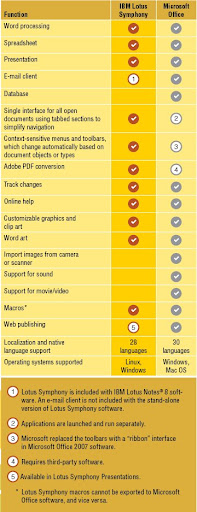
But having said that, Symphony doesn't try to be everything Office is. Remember the stats about most users accessing only the basic functions? Symphony gives you most of the features you'd see and use -- practical!


Source: Lotus Symphony Brochure


You sure or not? That sounds too good to be true. What's the catch?
That's what we're here to find out.... watch out for the next post where we pit Symphony and Office to a couple of simple head-to-heads and see who comes out tops.

Stay tuned!!


Find out more and download from the from Lotus Symphony website.
http://symphony.lotus.com/software/lotus/symphony/home.nsf/home

Add free upgrades and soup-up Symphony.
http://symphony.lotus.com/software/lotus/symphony/plugin.nsf/home
Sunday, October 5, 2008

Chrome... chrome... bup-bup-be-doo-whop...

In my earlier post about the fastest browser in town, I said I'll be taking Google Chrome for a spin.  I have been using it for a few days now and as a strong Firefox supporter, I have to say this about Chrome - hey, not baaad at all... :)

Like most things Google (I'm a heavy user of Gmail, Google Maps, Blogger obviously, and of course, search!), this app is quite nicely thought out.  The boys probably did their homework, found out what features users liked about their browser, and tried to incorporate them into one 'simple' browser... and out came Chrome.

The installation was a breeze.  I read the end user agreement, agreed (as if you'd disagree?!) and proceeded.  After a couple of clicks, I practically left it by itself to do its own thing.  A few minutes later when I came back, it was done.

And by 'done', it meant Chrome had imported all my favourites / bookmarks, browsing history, IDs and passwords.. the works!  When I started browsing in Chrome, it seemed like I'd been using it for ages!  Its a bit freaky if you think about the security aspect... but hey, for the majority of users, they'd appreciate the seamless migration!

Oh, and a plus point was that Chrome didn't try to muscle its way to be THE DEFAULT browser.  Its happy playing second fiddle if you tell it to, and won't complain.  Aah, sweet silence!

BTW, Chrome is still in beta, so there may be some bugs along the way...

What I liked so far:
  • More than just for URLs -- you can type in anything in the 'address bar' and Chrome will automatically find best URL matches, or Google searches in one go.  You just need to decide which one you want.  This does away with needing a Google bar or needing to first go to the Google site to perform a search.

The result is a mixture of URLs and suggested searches


  • Your favourite sites in one glance -- By default, when you open a 'blank' tab, google shows you thumbnails of your most frequently accessed sites, automatically!  I find this way cool -- you don't have to even pull down your book marks, or tell google which is your favourite.  Google figures the more you access a site, the more you'd appreciate it being easily accessible.  And I say, 'way to go Google!!'

All your favourite sites in one glance... sweet!

  • 'Intelligent' password storage -- This sounds fancier than it really is, but the slight tweak makes a world of difference.  You know the nifty feature that IE and Firefox has?  The one that prompts you if you want the browser to remember an ID and PW you just keyed in?  The two browsers ask you that question the moment you enter the ID and PW.  That's fine, if you had entered the right info... but what if you were guessing, and were not sure if you keyed it incorrectly?  Chrome instead waits till you have successfully moved on (i.e. logged in) to the next page before asking you.  That way, you'd know what you are asking Chrome to remember is indeed a correct one.  Just a slight delay, but yields brilliant results!

Decide to keep the ID/PW only after 
you see if you've entered the right one

  • Clean screen, really! -- Okay, some may actually find this feature a bit unnerving.  Chrome takes up very little screen space.  Icons are minimalist, there isn't even a menu bar... just like the Google search screen, clean and simple. 

Simple and uncluttered

  • Peekaboo! -- In line with the clean screen, there isn't even a status bar at the bottom.  If you're used to peering down at the status bar for link information and loading status, you'll notice Chrome still has that but is hidden mostly.  It only pops up when there is something interesting to tell you.

Magically dissapears after it's done its work...

  • Downloading simplicity -- Again, a little window pops up at the bottom left corner, giving you the status (KB complete) of whatever it is you're downloading.  And when down, it sits quietly there until you decide on what to do with it.  Firefox would have needed a little add-on to do that while with IE... well, I don't really care how IE does it actually!

Know where your download stands at one glance

Simple but effective choices...

So, is Crome perfect?

Far from it, but it has a good chance of getting there some day!

Chrome may sometimes get distracted and either refuse to or forget to load a page.  Take TheStar for example... nothing difficult or weird about this site, but for some reason, Chrome took a couple of retries before it could load the page.  I'd also faced some difficulty with the some of the trickier pages in Facebook and MyBlogLog. 

Hello... anybody there?

So what's next... dump Firefox (or whatever is your favourite browser) for Chrome?
Again, not quite.  Being still in Beta, means that there are practically no add-ons and nifty things you can install to enhance Chrome's features.  I'm guessing its a matter of time that all those add-on builders who've been contributing to the vast selection of nifty gadgets for Firefox start building the Chrome equivalent eventually. 

Anyway, as Chrome is still at a relatively early stage of development, things should only get better... especially with the vast resources that Google has at its disposal.  So stay tuned and watch out for even more goodies from Chrome.

** Anybody tried using Chrome and have your own opinions?  Pls share them in the comments... would love to hear from you!! **

PS.  In case you're wondering, the title of this post was taken from a Garfield movie where native Hawaiians were worshinping Jon's old car that had lots of shiny chrome bits... :)


Sunday, September 28, 2008

Digital Convergence

I've been down with a bad throat these couple of days. Throw in a mild fever and body ache, and my weekend's pretty much stuffed. So what's a guy to do when he can't take his kids out for the usual weekend spin or swim?

The boys have been very understanding ... and between catching up on some school work, a couple of siestas, their sunday school and a bit of PSP, they were actually quite happy to stay at home!

As for me, it was a good excuse to catch up on some office work, some Astro and to check out the blogsphere. You'd be amazed at the interesting things you find people talk about! From games, to papayas, to recyclable wallets.

Then I spotted this advertisement featured in WongPK's blog.


This talks about Microsoft Surface, a combo of Vista-driven PC hiding behind a touch-sensitive display. It still remains to be seen if this product will take off the way the add envisions it, but wow, can you imagine if it really worked?

What a concept!


Saturday, September 27, 2008

Fastest browser in town?

Most of us who spend quite a bit of time in front of the screen, would have a favourite browser. If you have not bothered to do anything to your PC, and started browsing out of the box, then chances are you're using MS Internet Explorer.

There are plenty of people (I'm one of them, heh) who throw scorn on MS IE -- and for good reason! It's clunky, lethargic.. and I think the fact that it was forced on Windows users probably made it public browser enemy no 1.

The guys using Macs have it made. Their Safari browser is, like many things Apple, super cool... and guess what, in many cases, they are super fast as well!

I used to use Opera... and quite liked it. I forget why I dropped it... probably because I didn't install it when I had my notebook replaced!

In recent years, have been using Mozilla's Firefox... and have been a happy customer. Their tab browsing came aeons before IE. And especially with V3 today, is even better.
Plus it has the bonus of being support by a wonder slew of free add-ons. My favourites are:
  • PicLens (now called Color Iris -- you ain't seen the web until you've seen it through PicLens!) and of course
A month back, Google got into the thick of the action by introducing Chrome. I've been meaning to give it a test drive -- you know, to see what all that hype was all about. I probably will have to find some time to do that -- one day!

So the question will inevitably come up -- which of these browsers are the best? Every one of the browsers will tell you they are best. And if you look close enough, they are probably focusing on one specific of performance. Like ability to render HTML, or speed to process Java Script, or uses the least memory.....

Is there a clear winner?

Kevin Purdy of LifeHacker.com posted this excellent compilation of browser performance. In that post, you'll see for yourself, which browsers are best at which category. One thing you'll notice, is that IE's (both 7 and 8) performances are the most consistent. Consistently worst or among the worst, that is!!

Check out his site and you'll decide for yourself, which is best. As for me, I think I'm quite happy to stay with Firefox for now.

Wednesday, September 24, 2008

Question from Scooba

I received a comment left by a reader who was having trouble with his Synctoy folder pairs. I'm not really a tech expert, but if I understood his message correctly, I think this should help.

In short, I think here's the situation
  • he built a folder pair between his PC's HD and an external (likely USB-connected) HD
  • one day (mysteriously) his external HD is assigned a different drive letter by windows
  • all the previously configured folder pairs now refuse to work
So here's my response... I thought perhaps this may be of help to others having this same problem.

Dear Scooba, sounds like a problem where your windows decides to assign a different drive letter to your external drive... did I understand that correctly?

If it is, then don't worry, its a fairly common problem.

I used to tear my hair out when iTunes and Picasa couldn't find my music and photos respectively when suddenly one day the drive letter got changed.

The easy way out of this is to change the letter back to the one which you used to set up your folder pair. And no, I'm afraid the same problem exists for XP, so I'm afraid we can't blame vista for this doozy.

Try this (I can comment for XP only, sorry, can't comment on Vista)...

- go to Control Panel ==> Administrative Tools ==> Computer Management

- on the left window, click on "Disk Management"

- on the right window, select your external HD

- Right-click that HD and select "Change Drive Letter and Path"

- BE VERY CAREFUL WITH THE ABOVE SELECTION..... because if you click the next one, it would be to FORMAT your HD....!!

- A small window will pop up and you'll be able to assign your drive back to the original letter

- click OK and your folder pairs should start working again

Hope you find this useful.... I find myself doing this quite often... especially if you're like me and have up to 3 external HD's running at one go... and need each of them to have one specific drive letter!

Cheers!

Tuesday, August 5, 2008

What do you do with the junk in your drive?

Ever noticed how your hard disk free space seems to shrink even if you feel you're "not really" creating or downloading lots of documents? The truth is that your free space really does shrink after some time. And that's usually due to 'junk' that gets created 'naturally', and tends to accumulate as time passes.

Here are some of the most common space eaters.... and a couple of suggestions on what you can do about them:

1) The ever expanding trash can
  • Reduce the trash size % if you have huge drives (10% of a 1TB drive is 100 GB of trash ya!!)

2) Web browser cache
  • Do a one-time review of the allocated size and then leave it alone
  • Many tools offer quick fixes to free up your HD by deleting the cache... which is kinda a con as when you start surfing, the cache will start building up again
  • Clearing your cache give a very temporary (and likely pointless) relief!

3) Review and spring-clean your temporary folders (not advisable if you're not keen on getting your hands dirty... or have no idea what you're messing with!!)
  • C:\WINDOWS\Temp -- look for fossils that take up lots of space. If you don't see anything big, leave the rest alone. They should clean themselves up. And, you wouldn't want to accidentally delete stuff which you actually need, like cookies.
  • C:\Documents and Settings\Administrator\Local Settings\Temp -- ditto above, except there are no internet files nor cookies to worry about here.
  • Temporary zip paths -- If you access a content within a zip file, and you close the zip file while the content file is still being accessed, that file will remain in the zip temp drive indefinitely, and you'll need to manually delete them.
  • Search for core-dump files -- especially important if you have buggy apps installed. These dumps are usually found in the application path of the offending application. Hint: files usually end with '.dmp' (I have 2 such nasty little Java-based apps which periodically generate multiple 100MB-sized core-dump files!!!)

4) Accidental copy and pastes
  • This can sometimes happen so fast that you don't realise you've just duplicated a whole bunch of files with an extra Ctrl-C, Ctrl-V combo
  • Unless you have a tool (see below), manually searching each directory and removing these duplicates are a real pain
  • Or if you are feeling lucky, do a search for all files starting with "Copy of...." and delete them!!

5)Forgotten ones and the useless extras
  • How do you delete extra files which you don't even know exists?
  • You need tools!


Hey, are you trying to sell me something?
  • No. Unless you consider introducing to you some of my favourite freeware tools as selling. :)

So what are they, come on, tell already!

  • Find out which of your folders are taking up most space. TreeSize Free is my absolute favourite freeware for this category. Its fast, simple and the visual presentation really helps.

As with most system tools, PLEASE READ CAREFULLY the instructions of each of the tools. You're deleting stuff here, so you don't want to mess up your system while spring cleaning okay? :)

Ridding your drive of crud is a good thing. But that's not all. There are other things you need to do too, to keep the HD spinning away hapily. I'll be covering a few other nifty tools in a future post!

( Due apologies to WLE and other Mac users -- can only blog on stuff I know about or have actually done... and I have not used a Mac since the days of the G4! Soli aah...)


Tuesday, July 29, 2008

Ain't it Cuil? (pronounced 'cool')


Big news on the technology front today... firstly, is the unveiling of the commercial space carrier, White Knight two, and then this -- cuil.com -- touted by some to be the eventual 'Google slayer'.

Cuil.com is built by ex-Google staff, and they claim that they have built a better search engine than their ex-employer's.

But a search engine is a search engine is a search engine, right?

Most search engines will tell you 'no'. Like in the case of Google, it has secret rules and complex formulae to allow them to rank a page largely by popularity, in order to return the best results for any given search. Yahoo and others have tried to replicate the 'intelligence' in the search but failed.

With cuil.com, they hope to leapfrog Google with something even more advanced to give better results by topic relevance and not mere popularity. The key difference is that it tries to understand and merge 3 things together...
  • The context of your search statement or question
  • The context of the contents in the 121billion web pages Cuil claims to index. (That is almost 4 times to what observers estimate what Google is indexing today)
  • The context of the pictures in those web pages they index

The result is supposed to be more intelligent search results that are accompanied by relevant pictures.

These guys just launched this service, and will have some fine tuning of the algorithms to do. And so far, the results have been quite amusing. There are spot-on hits, and quite a number of misses as well!

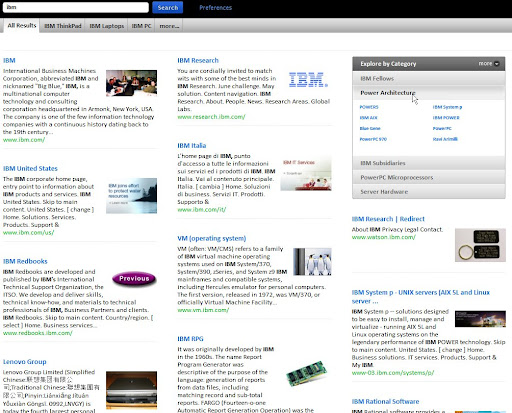
For fun, I did a number of searches and here are some of the results:

Search #1 - a famous, iconic brand, such as IBM.
  • Subjects closely related to the company are neatly organized into sections with helpful descriptions on the subjects giving user a preview of what to expect
  • Explore by Category box conveniently provides further related topics organized in neat sub-categories
  • The images that accompany the results look quite 'normal' initially until you start looking at them closely, and you realize that some of the items (See the 'previous' button?) don't quite belong there


Search #2 - Topic of the day, e.g. White Knight Two (dunno what's that? Read my next post coming soon!)
  • First result got the correct subject, but the picture showed a white orchid (probably of a similar name). Another shows the knight chess piece!
  • Subsequent ones had the correct picture but the subject was totally different
  • Get this, there's even a picture promoting Japanese AV (porno) title (see bottom right)! Just how that is related to a space ship is beyond me!! In fact, The Register had also reported something similar, in that the search for a French academician resulted with gay photos!!


Search #3 - Local blogging personalities - Paul Tan (motoring blogger)
  • Successfully showed his blog as the first search result! Not bad.
  • Seems to share the same penchant as Google to display results from Wikipedia (which isn't necessarily a bad thing!!)
  • Interestingly, the Explore by Category box decided to list down things related to Malaysia instead. Quite a nifty feature and pleasant surprise


Search #4 - Local blogging personalities - Kenny Sia (er, famous blogger?)
  • Lists other bloggers or articles talking about him, but interestingly, does not show Kenny's actual blog! Poor Kenny!


Go ahead, try it yourself and have some fun. Do tell me if you get any interesting results!! :) ==> Cuil.com


You think you can survive a hard disk crash?

If you think about it, its kinda like the subject of death.

Everybody knows that it is bound to happen. Its just a matter of time, some say. Yet, people would rather not think about it... and hope that its something that happens only to 'other people'. And even if you do prepare for it, or think you are for such an event, it is never pleasant and the results, often devastating!


Ouch!

But life goes on!! Really. Unless you're resigned to good 'ole paper letters, listening to music from vinyl or CDs, watching in VHS of DVD movies and storing all your photos in reams of hardcopy albums, you're bound to have emails, MP3s, AVIs and JPGs which you need to store in the hard disk in your PC.

The obvious answer, to protect yourself from losing data in a crash, is of course to backup. And there are loads of backup solutions our there which you can use. Just Google for "freeware backup software" or some derivative of that and you'll find more solutions than you need. Or, if you're too lazy, you can find a few useful ones here.

However, I have a problem with the way most backup software works. Typically they take a complete backup of whatever it is you need to protect. And then, you'll need to do periodic backs to ensure the latest data get saved as well.


The simplest way is to do a fresh backup every time. That means you backup an entire copy of everything you have (both old and new files) into a new backup image. Its simple, it has everything in one image. But doing full backups take a lot of time and a lot of storage space. You'd have to be super kiasu, super kiasi, and super rich to afford the storage for such a solution.

The alternative is to do a one-time full backup of what you have at that time. And for the newer files, you do incremental backs. The software cleverly figures out what is it that has changed since your last backup and stores only those.

That cuts down on the massive storage you need. But now, if you need to restore the data, you'll need the original image plus all the incremental backups to be able to restore things completely.

Oh and depending on the software, you may not be able to access the individual files from your backup unless you restore the full image. Which is a major drag if what you need is just to get one single item from your years of backup!

Having fun yet?


Someone forgot to backup?

Honestly, I have never bothered with this kind of backup!

What I really need is to be able to have a copy of the same thing onto another hard disk; and be able to access that backup the same way I would access my main data. In other words, what I need is a 'mirror'.

This is where I introduce to what is likely the BEST MICROSOFT TOOL for this kind of needs. This tool is very simple to use... small and lightweight... fast... its been around and has been running reliably for me... and best of all, its FREE.

Friends, if you don't already know what I'm talking about... its the one of MS' best kept secret, the MS SyncToy.

What it allows you to do is to create 'folder pairs'. And you have a choice of using 5 different relationships between the pair of folders to achieve what you need to do.
  • Synchronize - Whatever you do on each side of the folder pair is replicated to the other side. Useful when you need to work on both folders and want all your changes to be reflected to the other side.
  • Echo - Like the above but synchronization only happens one way. (MS describes it as from the 'left' or source folder to the 'right' or target folder)
  • Subscribe - Like Echo, but this time it is from 'right' to 'left'
  • Contribute - Like Echo, but if you delete a file from 'left', the same file on the 'right' is left untouched
  • Combine - Like Synchronize except renames and deletes are not replicated over
Simple-to-use interface

It just take a minute to set up your folder to be backed up. And running it requires just another click. The initial run for a new folder pair will make an exact copy of whatever is it you have on your souce folder. For subsequent refreshes, SyncToy intelligently and very quickly scans through and only picks out the updated files to act upon.

A couple of pre-requisites though.... Firstly, you need to have the MS .NET Framework for SyncToy to work. (yeah, groan!) Secondly, get yourself a second hard disk. It wouldn't be much of a backup if you copied your data back onto the *same* hard disk, right?


Still wondering if you can survive a hard disk crash?

If you already have a backup solution, PLEASE continue and be diligent in backing up!

If you don't have one, then give MS SyncToy a try -- you'd stand to lose more by not doing anything!

This tool isn't perfect though!

After a while of using it -- especially if you're not careful with configuring your folder pairs -- you'd end up with the potential problem of having too many duplicate files in your target folder. Its not life-threatening or anything!! Just an annoyance.

But fret not, in my next post, I'll talk to you about another nifty tool to fix this problem!

Sunday, July 27, 2008

Best places to buy IT stuff in Malaysia...

Come this August 1st to 3rd, we'll be having our PC fair for the Klang Valley.

For many of us who need to get an upgrade or buy that shiny new 22" wide-screen, that will be *the* event to attend.

Of course if you can't make it to that event, or chose *not* to go because you want to avoid the sardine-packed crowds, there's always the trusty LowYat in KL or Digital Mall in PJ. These IT marts are open 7-days a week and offer good deals if you're game to bargain a bit.

If there are friends coming down from Penang or anywhere out of town, looking for a good place to buy IT stuff, the above would be my usual recommendations.

BUT, are these places really the cheapest in town?

A couple of friends I know actually prefer to get their gear from Ipoh or even Taiping!?! They say that those are the places where the prices are really low. I've been to Ipoh a few times. But it always for the delicious food. But never, ever, for tech! Same for Taiping... lovely town, but never imagine it would be a place to buy cheap tech.

So here's a question to you. Are there Ipohites and Taiping-uh-hites(?) out there who can comment about this? Is it really true that you can get peripherals and stuff at cheaper prices than here in oh-we-are-only-at-7.7%-inflation-KL?


.

Saturday, July 19, 2008

Internet at the speed of molasses (Malaysian version)

Pop quiz:

What do you do when you cross broadband with a garden snail?

Dunno? Give up? So quickly?
If you're Malaysian, chances are its staring at you right now... its in your face!

Answer: Streamyx (my ADSL service provider).

As I type this, its been over 120 seconds since I typed in Streamyx's add into a new browser window, and I've yet to see anything. Remember, this is Streamyx's own website!
All I get is this:


Yes, I am severely cheesed off with these guys.

My broadband connection has been on the fritz for the past few days... couldn't VPN back to my office network (which isn't necessarily a bad thing!) ... and doing general surfing was a royal pain in the behind.

Posting or doing anything on Blogspot has been dreadful... with simple pages taking forever to load, and longer still to post. Aaarggh!!! Streamyx, if you continue as you are, you may actually be single-handedly responsible for reviving good old morse code in Malaysia. That would likely have higher data rate than you!!

A search on the internet (again, patience required by the truckloads) shows Streamyx has quite a lot of upset customers! There's even a site called StreamyxSucks!

And here is an example of the neat banners they have made available to get the message across.

Streamyx Sucks

Monday, July 14, 2008

How much space do you need?


The first fridge we bought was a 2-door LG behemoth with a whopping 430-liter capacity. My better half (MBH) thought I was totally out of my mind. I thought it was perfectly reasonable. Fortunately as that was the first few things we were buying for our home, I got my way.

In hindsight, I should have used that leeway to max out on the largest screen TV and baddest-ass hifi set, instead of a crummy fridge! Well, live and learn, I guess.

What's the big deal about a 430l fridge you ask? Well, for starters that's equivalent to the storage space of about 14 minibars. There were only 2 of us, and we didn't really cook. So to be fair, that size could be considered a tad cavernous for us then. So to make full use of the fridge, we started keeping all sorts of things in there.

Not quite like this, but wouldn't it be neat to have something like that?!?

My personal record was keeping about 6 assorted Cosway mooncakes in the deep freezer until the 10th Chinese Lunar month.... of the following year!! Occassionally we'd clean the fridge and find long lost, frozen artefacts in there... kinda made me feel like an icelandic explorer hoping find a woolly mammoth intact in the ice.


We were never quite sure what we'd find in there!

Fast-forward to today, and the faithful LG icebox is still chugging along, keeping good tempreture without breaking a sweat. Of course these days, it is stuffed to the brim with all manner of real and edible food. Finding that we were not having enough space, we resorted to getting a dedicated freezer for all the protein sources to meet the carneverous needs of my boys.

Occassionally, out of fun, or out of the need to proof that I'm the better judge (which I tend not to be), I'd bring up the 'fridge story' as an indication of how much foresight I had in choosing one that was big enough to meet our future needs!

That anecdote was getting trite, but it didn't stop me from using it ("one can never have too much storage space") when I needed to get yet another hard disk. This would be my 5th hard disk, and I was running out of excuses:

  • My first HD was a 40GB 2.5inch notebook drive put in an external casing. MBH accidentally dropped it one day, totally ruining it. The lost of the data within was devastating!
  • I next bought a 300gb disk. Had a perfectly good alibi -- needed space to store all the pictures I'd taken and my previous HD was broken.
  • Then I bought a 500gb disk. There was yet another compelling story to be told -- I needed a secondary hard disk for backup, and besides, the 500gb was then even cheaper then the 300gb one I bought previously. (It helped that MBH had dropped the first one, making her acutely aware of the need for a proper backup image!)
  • My friend and mentor, Mark, came over from Melbourne one day and plonked a 300gb disk on me -- "here ya go, enjoy". So I had a windfall there -- free drive plus a bazillion cool things that came stuffed in the hard disk!
Its been barely 6 months since I had bought the 500gb disk, and I was greedily eyeing the new Western Digital Caviar 1TB Green drive. The 500gb disk was still only 60% full, and I had no immediate plans (or ideas) for filling up the rest of the 200gb. So in a sense, I was more short of excuses (to buy the 1TB) then I was on space.

Then along came a perfect excuse. A terabyte-worth-of-data kind of excuse.

Picture this:

Me: Dearest, I was kinda thinking I could do with a hard disk -- you heard about the WD 1TB drive?
MBH: Hmm... ?
Me: You know, the pervious Seagate one I bought... its going to run out of space eventually...
MBH: You're not going to tell me the fridge story again are you?
Me: No! Of course not dearest, it wouldn't be fair... even if it was true
MBH: What dear?
Me: uh, I said it wouldn't be fair... and I must be fair to you... heh
MBH: I think its cool too to have a 1TB drive, but what do you want to do with it that you can't already do with your 500gb?
Me: I can do *twice* of what I'm doing with my 500gb! :)
MBH: Right.....

Then came a whole bunch of half-baked reasons, justifications and sales-pitches to convince her (and partly, myself) that it made sense to buy the 1TB drive then.

Me: I mean, like, think of the kind of bragging rights I'd have, right!!
Me: I promise I'd load up '24' and House and your favourite serials for your easy access...!
Me: Seriously, this would be the last one I need for a long time....
Me: Aw common... can't a guy have his fun? (was beginning to get desperate)
Me: Look sweetie, how about if you thought of this as a Father's day gift... you've been saying how hard it is to get me something, right?

That last one, I must admit, was kinda low, even by my already compromised standards. But hey! That actually worked! MBH finally relented and said I could get silly and buy it. *grin*


My ensemble of spinning disks whirling happily away on top of the PC.
Took one of Mark's brilliant ideas of using a notebook cooler
(see the grey pad under the 2 harddisks?) to effectively manage the heat in my 2 fan-less enclosures.


A couple of decades back, this would have taken up the size of a room, needed some serious cooling and power cabling ... and the people responsible for cutting over 1.8 terabytes of storage would have thrown a champagne party for such a big milestone. Sorry, but I digress.

Anyway, RM 880 (650 for the HD and 130 for the excellent enclosure -- see above pix, left most hard disk) later, I had, tucked under the console table, more storage than any sensible bloke would ever need in his entire lifetime. Of course, for a tech-fan who also has a severe case of collectoritis, being 'sensible' simply meant looking for the next great excuse to use when I desperately need to get my next 2TB or 4TB drives in the future!

Hmmm... if I could get away with that fridge story again?!